
The Problem: Managing Recurring Tasks Manually
Sound familiar? Every month someone has to remember to create the maintenance ticket. Every Friday a review ticket should be created. Quarterly reports, annual license checks, weekly backup controls - everything has to be created manually.
In many companies, this leads to:
- Forgotten tasks - Regular tickets are created too late or not at all
- Inconsistent processes - Every agent creates tickets differently
- Wasted time - Repetitive manual work that could be automated
- Missing traceability - No history of when which tasks were created
- No flexibility - Complex rules like "2nd Tuesday of the month" cannot be mapped
The Solution: Automatic Ticket Creation with the TicketScheduler
The TicketScheduler Add-on for Znuny 7.2.x automates the creation of recurring tickets. Define rules - the Znuny Daemon does the rest. Every 5 minutes, the system checks for due schedules and creates tickets automatically.
Screenshots
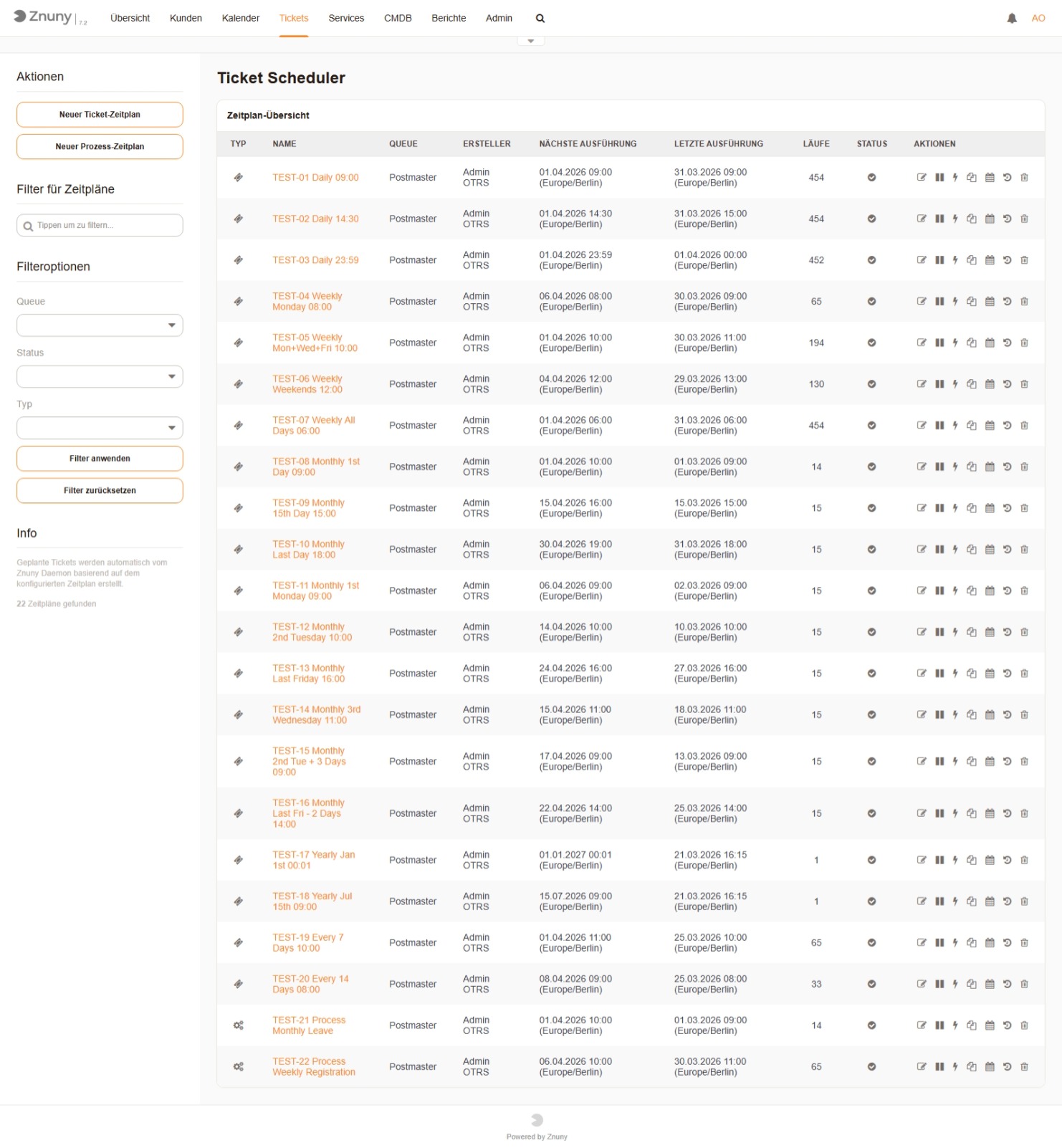
Schedule Overview:
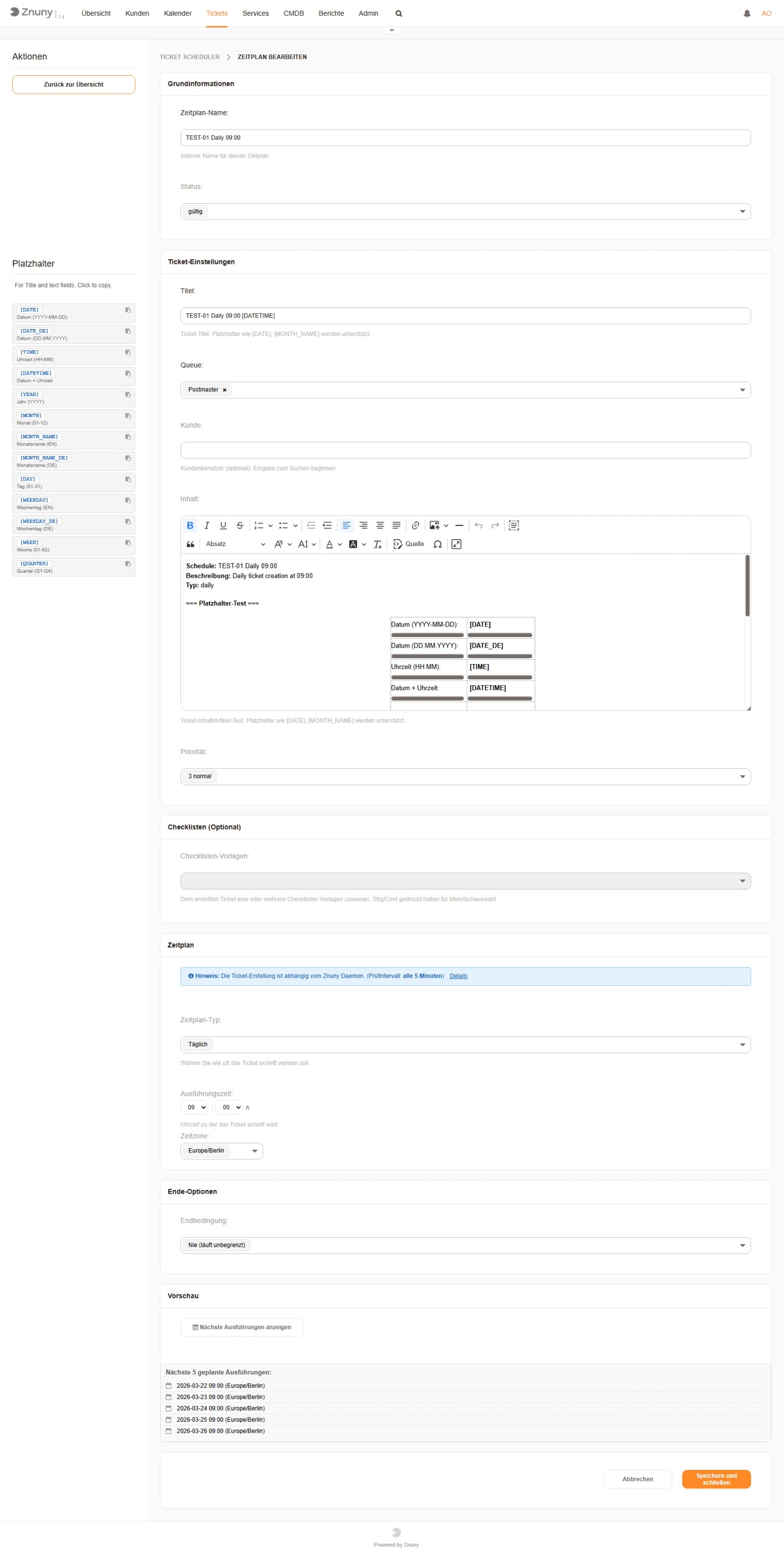
Edit Schedule:
Features Overview
7 Schedule Types
From simple daily rhythms to complex monthly rules:
| Type | Description | Example |
|---|---|---|
| Daily | Every day at a specific time | Daily at 08:00 |
| Weekly | On specific weekdays | Every Monday and Wednesday |
| Monthly (Day) | On the Xth day of the month | On the 15th of each month |
| Monthly (Weekday) | On the Xth occurrence of a weekday | On the 2nd Tuesday |
| Monthly (Weekday + Offset) | X days before/after a weekday | 3 days after the last Friday |
| Yearly | On a specific date | Every year on April 1st |
| Interval | Every N days | Every 14 days |
Normal Tickets and Process Tickets
Normal tickets with full access to all ticket fields:
- Queue, Priority, Type, Service, SLA
- Owner, Responsible, Customer User
- Title and Body with dynamic placeholders
- DynamicFields
- Checklist templates (optional)
Process tickets for automated workflows:
- Select Process and Activity Dialog
- Dialog fields are loaded automatically
- Pre-fill Activity Dialog data
- Requires ITSM / Process Management
Placeholder System
Dynamic content in ticket title and body:
| Placeholder | Output |
|---|---|
[DATE] | 2026-03-21 |
[DATE_DE] | 21.03.2026 |
[MONTH_NAME] | March |
[WEEKDAY] | Saturday |
[WEEK] | 12 |
[QUARTER] | 1 |
Maintenance Report [MONTH_NAME] [YEAR] becomes "Maintenance Report March 2026"
End Options
Control how long a schedule should run:
- Never - Run indefinitely
- After X Executions - Automatically stop after N tickets
- Until Date - Automatically stop from a specific date
Differentiated Permissions
| Group | Access |
|---|---|
| TicketSchedulerManager (RW) | Create, Edit, Delete in own queues |
| TicketSchedulerManager (RO) | View only |
| TicketSchedulerAdmin (RW) | All queues, sees error banner |
Clear Management Interface
The scheduler overview shows all schedules at a glance:
- Filters: All, Active, Scheduled, Failed
- Actions: Edit, Duplicate, Preview, History, Execute Now, Activate/Deactivate, Delete
- Error banner for administrators on failed executions
- Execution history with ticket IDs and error messages
Optional Extensions
| Add-on | Function |
|---|---|
| Znuny Checklist | Automatic assignment of checklist templates |
| ITSM / Process Management | Scheduling of process tickets |
Use Cases
Monthly Server Maintenance
Schedule Type: Monthly (Day)
Day: 15
Time: 08:00
Title: Server Maintenance [MONTH_NAME] [YEAR]
Queue: IT-Operations
Priority: Normal
Weekly Backup Check
Schedule Type: Weekly
Weekdays: Monday
Time: 07:00
Title: Backup Check CW [WEEK]
Queue: IT-Operations
Quarterly License Review
Schedule Type: Monthly (Day)
Day: 1
Time: 09:00
Title: License Review Q[QUARTER]/[YEAR]
Queue: IT-Administration
End Option: Never
Task After the Last Friday of the Month
Schedule Type: Monthly (Weekday + Offset)
Occurrence: Last
Weekday: Friday
Offset: +3 days
Time: 10:00
Title: Month-End Review [MONTH_NAME]
Technical Details
Daemon Integration
- Automatic execution every 5 minutes via the Znuny Daemon
- Console command
Maint::Ticket::SchedulerRunfor manual execution - Dry-run mode for testing without ticket creation
- Time simulation for development and testing
SysConfig
| Setting | Description | Default |
|---|---|---|
TicketScheduler::Enabled | Enable feature | 1 |
TicketScheduler::DefaultTimezone | Default timezone | Europe/Berlin |
TicketScheduler::MaxHistoryEntries | Max. history entries (0 = unlimited) | 0 |
TicketScheduler::LogSuccessfulExecutions | Log successes | 0 |
Data Preservation
- Four database tables for schedules, history, DynamicFields, and checklists
- Complete execution history with ticket IDs
- Error logging with timestamps
Installation
Installation works like any Znuny package:
Option A: OPM Package (recommended)
- Download OPM package from the Packages page
- Admin > Package Manager > Install package
- Done - the Daemon takes over automatically
Option B: Manual
- Copy files:
cp -r src/* /opt/znuny/ - Clear cache:
bin/znuny.Console.pl Maint::Cache::Delete - Rebuild SysConfig:
bin/znuny.Console.pl Maint::Config::Rebuild
After installation:
- Add users to the
TicketSchedulerManagergroup (RW for full access) - Menu item Tickets > Ticket Scheduler in main navigation
- Create your first schedule
Comprehensive Testing
The add-on is backed by 193 automated tests:
- 116 unit tests - CRUD, schedule calculation, placeholders, execution, history, DynamicFields, checklists, end options, feature detection
- 77 simulation tests - 90-day time-lapse with 64 schedules of all schedule types
Open Source
The TicketScheduler Add-on is Open Source under the GPL v3 license:
- Free to use
- Source code viewable
- Modifications allowed
- Community contributions welcome
Repository: codeberg.org/wolkig-it/znuny_ticketscheduler
Conclusion
With the TicketScheduler Add-on, you automate the creation of recurring tickets - from simple daily tasks to complex monthly rules like "3 days after the last Friday."
Benefits at a glance:
- 7 flexible schedule types
- Normal tickets and process tickets
- Dynamic placeholders for title and body
- DynamicFields and checklist integration
- Differentiated permissions
- Automatic Daemon integration
- Error banner and execution history
- 193 automated tests
- Free and Open Source
Try it out!
Download and documentation: codeberg.org/wolkig-it/znuny_ticketscheduler