
The Problem: Missing Communication During Maintenance and Incidents
Sound familiar? A planned maintenance is coming up, but how do you inform your agents and customers? The email distribution list doesn't reach everyone, the maintenance begins - and tickets pile up: "System not working!"
In many companies, missing communication leads to:
- Unnecessary support tickets - Customers report issues that are already known
- Confused agents - "Is the system down or just for me?"
- Missed information - Important updates get buried in the email inbox
- Inconsistent communication - Everyone informs in their own way
- Missing documentation - No history of past announcements
The Solution: Professional Announcements Directly in Znuny
The Announcement Add-on for Znuny 7.2.x brings a professional announcement system to your ticket system. Maintenance windows, incidents, and important information - centrally managed and automatically displayed.
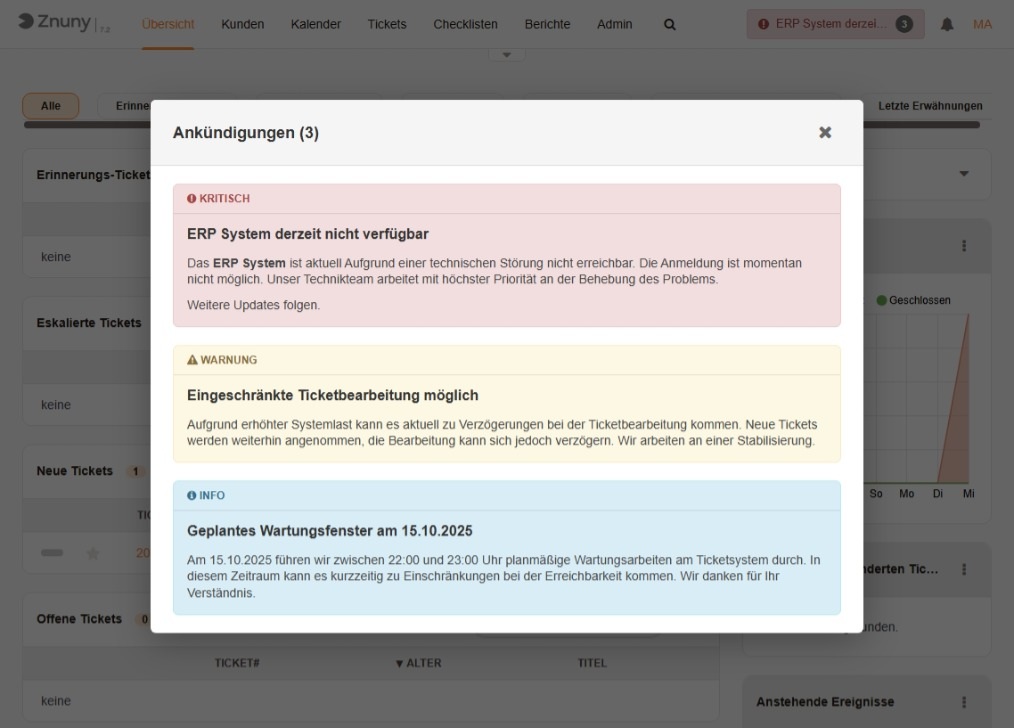
Features Overview
Three Announcement Types
Communicate with the appropriate urgency:
| Type | Usage | Color |
|---|---|---|
| Info | New features, updates, general notices | Blue |
| Warning | Planned maintenance, restrictions | Orange |
| Critical | Current incidents, urgent security notices | Red |
Flexible Target Audiences
Decide who should see the announcement:
- Agents Only - Internal information that doesn't concern customers
- Agents and Customers - Public announcements for all users
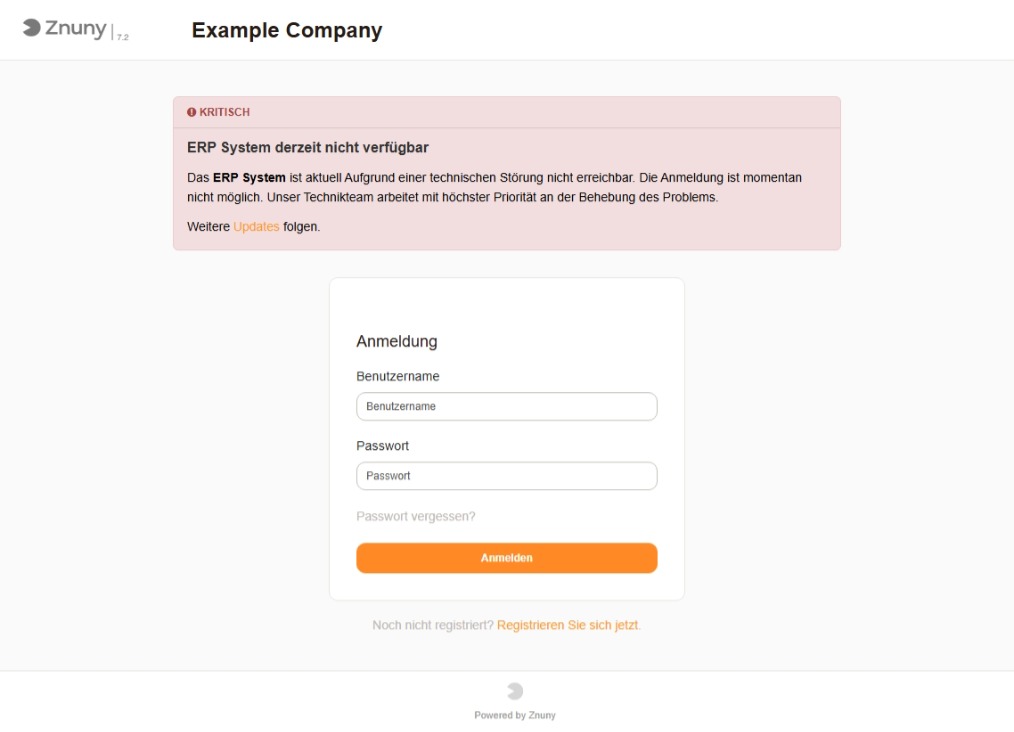
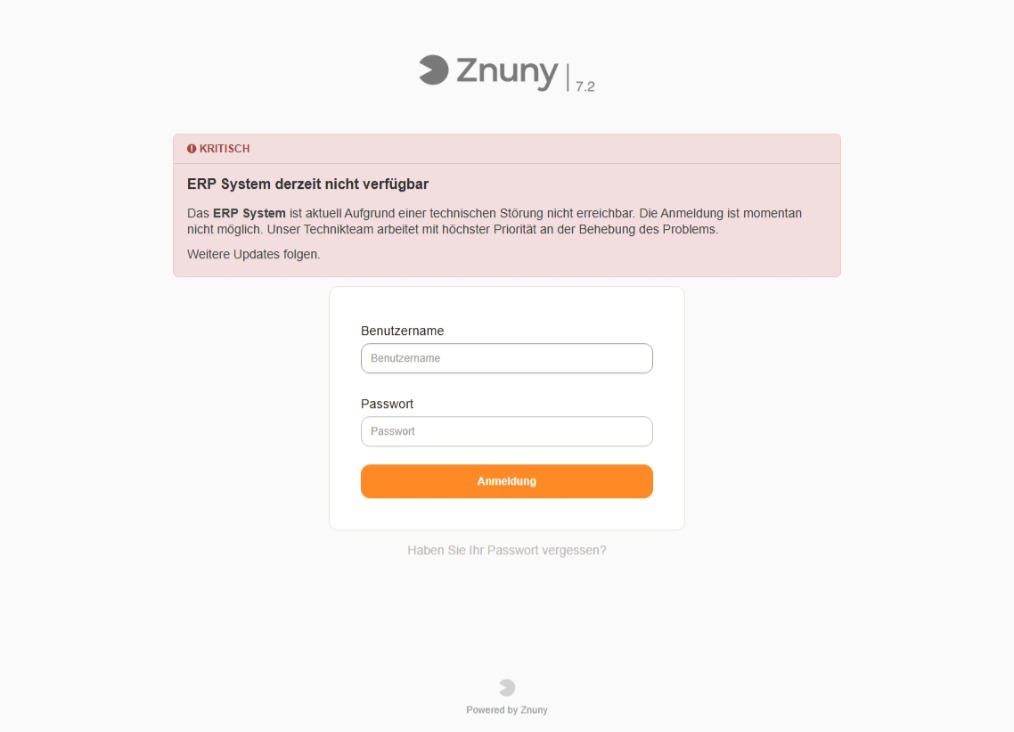
Login Page Banner
For particularly important information:
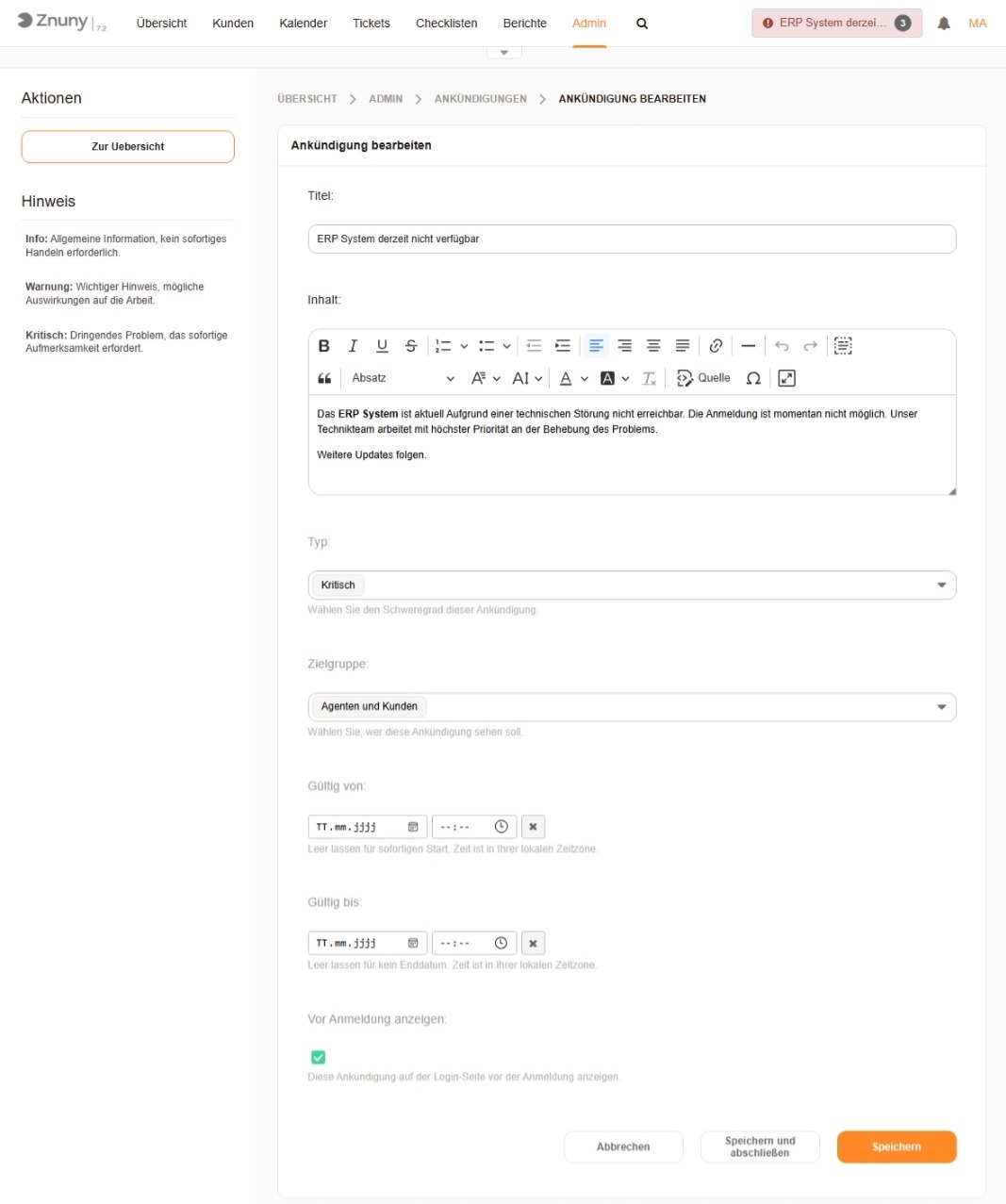
- Display before login - Users are informed before they log in
- Ideal for maintenance windows - "System unavailable from 06:00-08:00"
- Also for emergencies - Immediate visibility for critical incidents
Scheduled Publishing
Plan announcements in advance:
- Valid From - When should the announcement appear?
- Valid Until - When should it automatically disappear?
- Immediate publication - Leave empty for immediate display
- Permanent display - No end date for permanent notices
WYSIWYG Editor
Create appealing announcements:
- Formatting - Bold, italic, underlined
- Lists - Numbered and bulleted
- Links - References to more information
- Structured - Paragraphs for better readability
Clear Management Interface
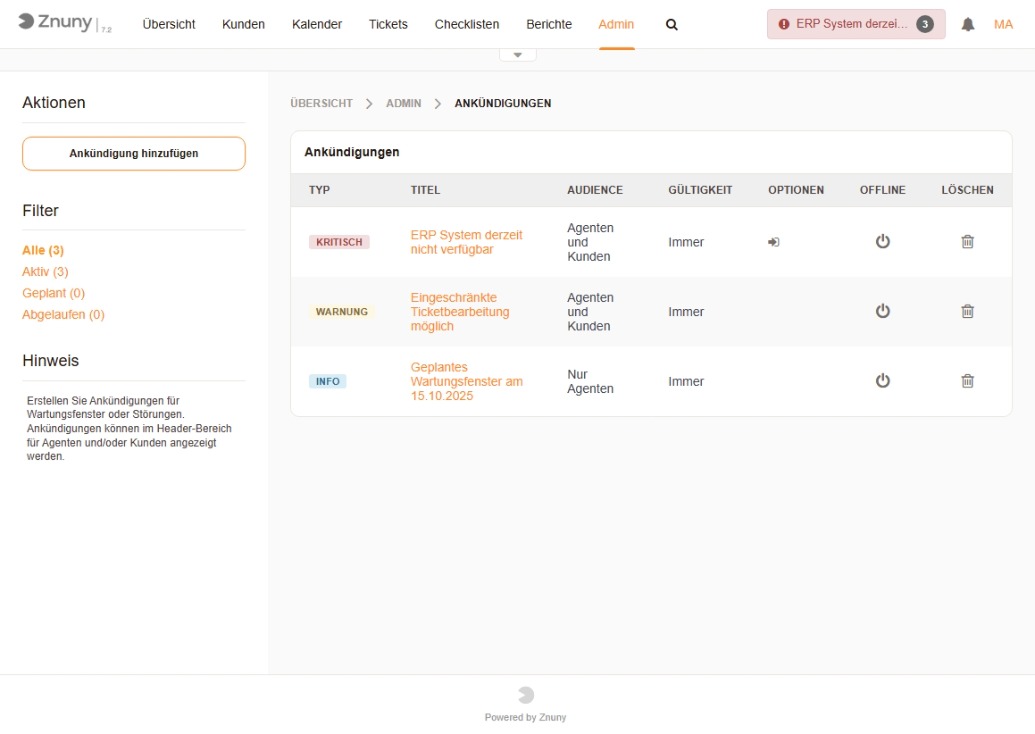
The admin interface shows all announcements at a glance:
- Status filters - Active, Scheduled, Expired
- Type display - Color-coded
- Quick actions - Edit, Set Offline, Delete
Fullscreen Overlay for Agents and Customers
Click on the header display to open all active announcements:
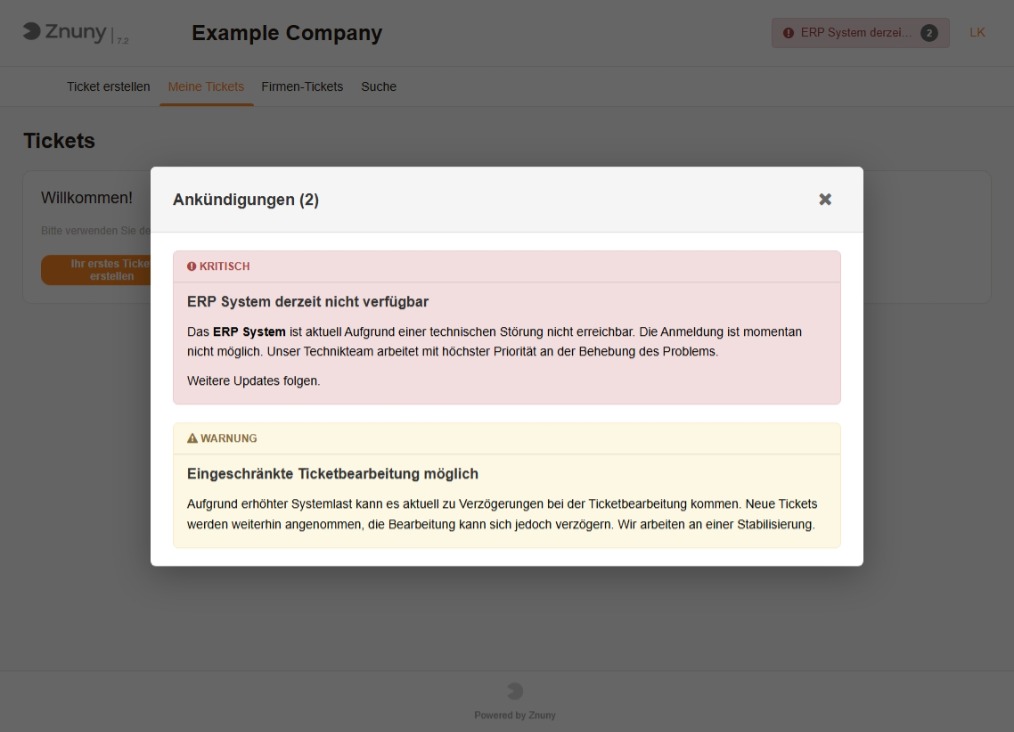
- All announcements as clear cards
- Type icon for quick orientation
- Close via X button, ESC key, or click outside
Use Cases
Planned Maintenance Window
Type: Info (Blue)
Title: Planned Maintenance Window on Oct 15, 2025
Target: Agents Only
Login Banner: No

Content:
On Oct 15, 2025, we will perform scheduled maintenance
on the system between 10:00 PM and 11:00 PM. During this
time, there may be brief interruptions in availability.
Thank you for your understanding.
Limited Availability
Type: Warning (Orange)
Title: Limited System Availability
Target: All
Login Banner: No

Content:
Due to increased system load, there may currently be
delays. We are working on stabilization.
Critical Incident
Type: Critical (Red)
Title: ERP System Currently Unavailable
Target: All
Login Banner: Yes

Content:
The ERP system is currently unavailable due to a
technical issue. Login is not possible at this time.
Our technical team is working with highest priority
to resolve the problem.
Further updates to follow.
Technical Details
Permission System
| Permission | Functions |
|---|---|
| RW in AnnouncementManager | Full access (Create, Edit, Delete) |
| RO in AnnouncementManager | View only |
Caching
- 5 minutes default cache for optimal performance
- Configurable in SysConfig
- Immediate update possible by manually clearing cache
Data Preservation
- Announcements are preserved on uninstall
- Easy reinstallation without data loss
- Optional deletion via SQL command
Installation
Installation works like any Znuny package:
Option A: Package Repository (recommended)
- Admin → System Configuration → Package::RepositoryList
- Add repository: Name
wolkig.it, URLhttps://wolkig.it/packages - Admin → Package Manager → Install "Announcement" from the list
Option B: Manual
- Download OPM package from the Packages page
- Admin → Package Manager → Install package
- Done!
After installation:
- Add users to the
AnnouncementManagergroup (RW for full access) - "Announcements" menu item appears in main navigation
- Create your first announcement
Open Source
The Announcement Add-on is Open Source under the GPL v3 license. This means:
- Free to use
- Source code viewable
- Modifications allowed
- Community contributions welcome
Repository: codeberg.org/wolkig-it/znuny_announcement
Conclusion
With the Announcement Add-on, you communicate professionally with agents and customers - during maintenance, incidents, and important updates.
Benefits at a glance:
- Three severity levels (Info, Warning, Critical)
- Flexible target audiences (Agents, Customers)
- Login banner for important information
- Scheduled publishing
- WYSIWYG editor for formatted content
- Clear management interface
- Free and Open Source
Try it out!
Download and documentation: codeberg.org/wolkig-it/znuny_announcement